Sync Outlook
between two or more computers or between your Desktop and your Laptop
- automatically
Do you use Outlook on more than one computer and want to keep your Outlook data like E-mails, Contacts, Tasks, Notes, Appointments or Journal Entries in sync?
Then you need this software to synchronize Outlook either between different Outlook data files (pst files) or between an Exchange Mailbox and an Outlook data file (pst file).
This Outlook synchronization tool supports Windows 10, Windows 8, Windows 7, Windows Vista and Windows XP (32bit and 64bit) in combination with Outlook 2016 (32bit and 64bit), Outlook 2013 (32bit and 64bit), Outlook 2010, Outlook 2007, Outlook 2003, Outlook XP, Outlook 2002 and Outlook 2000!


 Click
here to see how easy it is to synchronize everything you have in Outlook!
Click
here to see how easy it is to synchronize everything you have in Outlook!
Description
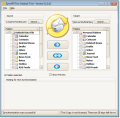
SynchPst for Outlook - the easy way to synchronize Outlook data
between personal folders. Choose either single or multiple folders, with or without
subfolders, and synchronize them quickly and efficiently.
Don't go through the elaborate process of copying and replacing your
pst files - synchronize Outlook pst files intelligently.
If the selected folder does not exist in the target pst file the entire
folder is copied, otherwise the source and target files are compared and the entries
are synchronized based on creation time and/or subject.
Do you travel and sometimes receive email to your laptop as well as
your desktop? Synchronize Outlook info with SynchPst for Outlook
and you will always be up to date.
Do you want to merge Outlook data files from several archived pst
files to a single pst file?
It's easy with SynchPst.
Do you use Microsoft Exchange and want to synchronize your Inbox with a pst file?
'SynchPst for Outlook' supports the synchronization of a Exchange
Inbox with a 'Personal Folders' file.
Benefits
- Synchronize Outlook automatically among your computers (Professional edition only)
- Share Outlook on two or more machines
- Synchronize Outlook with one click
- The read/ unread state of e-mails is synchronized.
- Sync Outlook on your notebook with Outlook on your desktop
- Lets you share Outlook contacts and Outlook calendars with your colleagues
- Synchronize all Outlook items - contacts, mails, notes, appointments and tasks and journal entries
- Supports deletions
- Customized forms are supported
- All fields including customized fields are synchronized
- Synchronizes your whole Outlook and / or only a special subfolder.
- Automatically updates your Outlook on your other computers or laptop
- If you delete an Outlook item on one side then this item will be deleted on the other side, too.
- If an item was changed on both sides since the last synchronization then you can solve this conflict manually or automatically (Professional edition only)
- You can exclude private entries from synchronization (Professional edition only)
- Synchronizes only the modified items of the last x weeks (Professional edition only)
SynchPST for Outlook comes in two Editions:
| Home Edition costs | 49.95 USD | Buy Now! |
| Professional Edition costs | 89.95 USD | Buy Now! |
You need to buy only one license to synchronize two computers if they are in the same network.
Volume discounts are available. Please contact us.
SynchPST runs on Windows 10, Windows 8 Windows 7, Windows Vista and Windows XP (32bit and 64bit) with Outlook 2016 (32bit and 64bit), Outlook 2013, Outlook 2010, Outlook 2007, Outlook 2003, Outlook XP, Outlook 2002 and Outlook 2000.
SynchPST is able to synchronize different versions of Outlook.
Comparison
| Those editions are able to | Home 49.95 USD  |
Professional 89.95 USD |
|---|---|---|
| Synchronize Outlook contacts |
 |
|
| Synchronize Outlook emails |
|
|
| Outlook synchronization of notes |
|
|
| Synchronize Outlook appointments |
|
|
| Synchronize Outlook distribution lists |
|
|
| Synchronize Outlook posts |
|
|
| Synchronize Outlook tasks |
|
|
| Synchronize Outlook journal |
|
|
| Supports deletions |
|
|
| Supports Exchange Mailbox |
 |
|
| Automatic synchronization in time intervals |
|
|
| Saves and restores selected folders |
|
|
| Optional manual resolution of conflicts |
|
|
| Can exclude private entries from synchronization |
|
|
| Filters emails only of the last x weeks |
|
|
| Filters appointments of the last x weeks |
|
|
| Filters time specific tasks |
|
|
| Supports batch file processing |
|
|
| Synchronizes password protected pst files |
|
|
 Getting
started
Getting
started